
Offers
Integrate Ascenda powered merchant funded offers into your Rewards experience
Ascenda provides a fully featured offers proposition which you can use to deliver rich offers selection to your end users.
Offers Overview
Offers are a way to provide additional, merchant-funded rewards to customers for certain actions or purchases. They come in three types: Card-Linked Offers (CLO), Affiliate Offers (AO) and Premium Dining Offers (CLO)
Offers is available in US market only. Talk to your Customer Success manager for accessing Offers in your local market
Card-Linked Offers (CLO)
Card-Linked Offers (CLO) are rewards that are linked to a customer's card. When customers make a purchase with this card at a participating merchant, they receive additional points or rewards. Based on the purchase data received from the card, rewards will be automatically applied to the user’s account once they are approved by the merchant.
Affiliate Offers (AO)
Affiliate Offers (AO) are rewards that are given when a customer makes a purchase through a specific affiliate link. When customers click on the link and make a purchase, they receive additional points or rewards. This requires tracking of the customer's actions through the affiliate link to ensure they receive their rewards.
Premium Dining Offers (Dining CLO)
Premium Dining Offers are the same as Card-Linked Offers (CLO) rewards but for restaurants only. When customers make a purchase at a participating restaurant, they will receive additional points or rewards. Based on the purchase data received from the card, rewards will be automatically applied to the user’s account once they are approved by the merchant. There's a wide variety of top rated restaurants across the US participating in our program.
Offers categories
Offers are available across these categories:
- Automotive service
- Food and drink
- Health and beauty
- Lifestyle
- Retail
- Travel
- Technology
- Other offers
Offers workflow for the End User
Refer to our full guide here for the end to end Offers experience you should embed in your site or app experience for your users.
Offers Integration Guide
To start using Ascenda's Offers content, connect with your Customer Success manager on getting Offers setup for your account.
Integration workflows for Offers
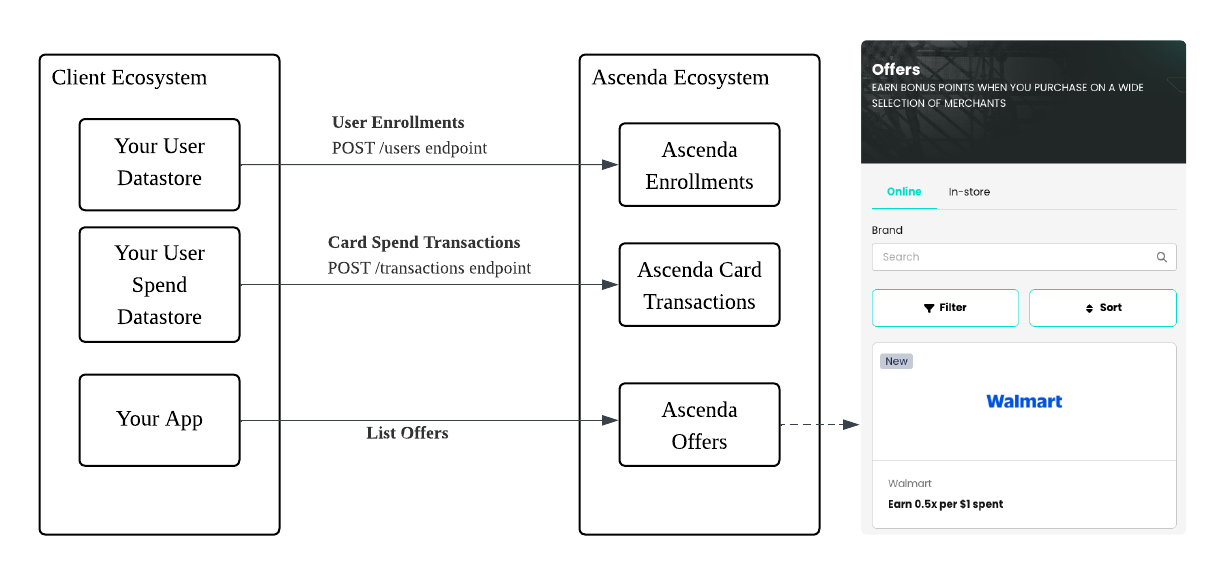
Steve to add a variant of this for Offers
Workflow 1: User Enrollments
User Enrollments is a pre-requisite for your end users to receive eligible offers recommendations. Prior to rendering eligible user offers you must enroll your customers into our platform prior.
Once you've enrolled a user, please continue to make sure incremental user updates are synchronised to the Ascenda dataset as well when changes occur to their user details.
Read our full guide here on User Enrollments.
Workflow 2: Card Spend Transactions for Offers recommendation
To use Offers, you will need to send transaction information via Create transaction API , the same way you do with Automatic Crediting . Transactions that are eligible for Offers will also receive points for accrual based on your configured earn rules.
The following fields are optional in Create transaction API , but they are required when you enable Offers in your rewards content in order to reconcile the transaction with merchants:
| Value | Type | Description |
|---|---|---|
| transaction_datetime | String | The datetime at which the transaction took place. It must be in ISO8601 format. |
| merchant_category_code | String | The numerical payment network code for merchant category. Must be a string consisting of 4 digits. |
| merchant_id | String | The Merchant ID (MID) value. This differs depending on which payment processor was used. |
| merchant_descriptor | String | The name of the merchant. |
| card_last_4 | String | The last four digits of the Primary Account Number (PAN) of a card. Must be a string consisting of 4 digits. |
| card_bin | String | The Bank Identification Number (BIN) of a payment card. Must be a string consisting of 6 digits. |
| processor_mid_type | String | Merchant ID (MID) type from the payment processor. Accepted values:\ • AMEX_SE_NUMBER- AMEX MID• DISCOVER_MID - Discover MID• VISA_VMID - VISA Merchant ID• VISA_VSID - VISA Store ID• MC_AUTH_ICA - MasterCard ICA (Authorization)• MC_CLEARING_ICA - MasterCard ICA (Settlement/Clearing)• MC_AUTH_LOC_ID - MasterCard Location ID (Authorization), similar to VISA Store ID• MC_CLEARING_LOC_ID - MasterCard Location ID (Settlement/Clearing), similar to VISA Store ID• MC_AUTH_ACQ_ID - MasterCard Acquirer ID (Authorization), similar to VISA Merchant ID• MC_CLEARING_ACQ_ID - MasterCard Acquirer ID (Settlement/Clearing), similar to VISA Merchant ID• NCR - NCR MID• MERCHANT_PROCESSOR - Any other MID |
| merchant_address | Object | |
| country_code | String | 2-letter ISO-3166 country code |
| country_subdivision_code | String | ISO-3166-2; 2-6 letter code for a country subdivision |
| postal_code | String | ZIP Code, ZIP+4, or postal code |
| street_address | String | Single or multi-line physical address |
Updated about 1 year ago